Contents
- Freedom Score Personal Link
- Freedom Score Settings
- Personalize Freedom Score Report
- Inviting a Contact to Get Freedom Score
- Freedom Score Assessment Embed
Freedom Score is a 10-minute, online assessment that evaluates your financial readiness to fund the next phase of your life after your business. Freedom Score calculates your Freedom Point – when the sale of your company will generate enough to fund your lifestyle for the rest of your life. Discover how to reach financial independence, de-risk yourself financially, and live worry-free in the next chapter of your life. Get Your Freedom Score.
Find your Freedom Score Personal Link
Click on Settings towards the upper right corner of your toolbar. Under your Personal Settings > Personal Links & Signature, you will find your Freedom Score Personal Link. You can use your Freedom Score Personal link in the same way you use your Value Builder Score or PREScore™ personal link (i.e.: social media, email signature, etc).
Freedom Score Settings
Customize your Auto Response Email
Within your Freedom Score Settings, you can set the defaults that will apply to your Freedom Score Assessment when calculating an owner's Freedom Point, as well as customize your Auto-response email.
- Show Report Settings will relate to whether a business owner can view their detailed report following completing the assessment or not and will have to wait to review the report with their advisor.
- Default Settings when calculating an owner's Freedom Point. The defaults set here will be what is used in all Freedom Score assessments when calculating an owner's Freedom Point. An owner can always override these and adjust for their business if needed.
- Disclaimer: This customized disclaimer will appear in the footer of the assessment.
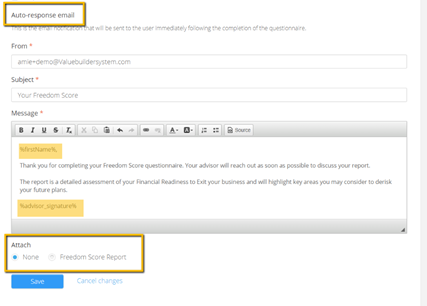
Auto-Response Email
This customizable email will be what is sent to a contact following the completion of the Freedom Score assessment.
Feel free to alter the default text being sure to leave anything appearing between %" "% as this is hardcoded and will become a clickable link or pull data from elsewhere in the portal.
You have the option to follow up with a contact and provide nothing or include a link to their full report in your auto-response email.
Personalize Freedom Score Report
Just as you can personalize your Value Builder Score report, you can personalize your Freedom Score report to include your Bio Photo, Bio, Cover Letter, and your selected Calls to Action.
- By default, the bio photo used in the Value Builder Score report will be pulled into the Freedom Score Report.
- You can Re-Use your bio from the Value Builder Score report or choose to customize it specific to Freedom Score.
- Customize the Cover Letter which will appear on page 2 of the Report. This will be used in all Freedom Score Reports and is your chance to provide some context on how you as an advisor can help them work towards achieving financial freedom as a business owner. Note: ensure you do not remove anything within the [ ] as this is hardcoded.
- Choose the Call to Action(s) you would like to appear at the end of the Freedom Score Report. You have 3 CTA options: Get PREScore™, Get Value Builder Score, or a completely customizable one where an owner can connect with their advisor. You can choose to enable one, two or all three CTA's. ALL options are customizable including the title, body text and CTA button title which appears and will link to either your personal Value Builder Score or PREScore™ link or the indicated connect URL.
Inviting a Contact to Get Freedom Score
As a value builder advisor there are many ways you can have a prospective client complete the
Freedom Score assessment.
You can invite a contact to complete an assessment directly from the advisor portal, by adding or selecting an existing contact profile and clicking Invite Contact to Get Freedom Score on the Freedom Score section at the bottom of the Scores tab. Customize the invite as needed on an individual contact basis. Once sent to your contact, you have the option to have a notification sent to you after a specified time period if the assessment is not completed as well as the option to re-invite your contact to get their Freedom Score.
Freedom Score Assessment Embed
In addition to all the settings and features listed above, you also have available to you a Company (and team if applicable) embed code. With this embed code you have the option to select to show the landing page or simply take a prospect straight to the contact form as well as have a phone number field on the contact form and whether this is a required field or not (Please note that this may reduce your completion rate).
You can also choose to add a URL to redirect a prospect to once they have completed the assessment.